v1.9.7.0

Advancing Compliance and Customization with Breeze v1.9.7.0
Breeze v1.9.7.0 introduces new capabilities designed to improve organizational compliance, streamline credential management, and provide better customization options. This release represents a solid step forward in making access management more adaptable, transparent, and user-centric.
In today's evolving regulatory landscape, organizations need tools that not only manage credentials efficiently but also ensure legal compliance and provide clear audit trails. Version 1.9.7.0 addresses these needs with improved Terms and Conditions management and advanced credential list customization.
Empowering Legal Compliance
Modern organizations operate in increasingly complex regulatory environments where legal compliance isn't just recommended—it's essential. With our new Terms and Conditions management system, organizations can now maintain detailed legal agreements with full version control, automated user acceptance tracking, and domain-specific customization.
This isn't just about checking compliance boxes; it's about creating a system that makes legal requirements seamless and transparent for both administrators and users.
Tailored Experiences for Every Organization
No two organizations manage credentials the same way. That's why we've introduced the Customizable Credentials List feature, allowing tenant administrators to create views that match their specific workflows. Whether you're managing hundreds or thousands of credentials, you can now see exactly what matters most to your operations.
Refined User Experience
Beyond major new features, this release includes thoughtful improvements to existing functionality. From enhanced column management to advanced date filtering, we've focused on the details that make daily tasks more efficient and intuitive.
Built for Reliability
Every feature update comes with a commitment to stability. This release includes important bug fixes and improvements that ensure your credential management operations run smoothly, from tenant selection dialogs to production site settings.
Breeze v1.9.7.0 is about giving you the tools to manage compliance, customize experiences, and operate with confidence. Whether you're implementing legal requirements or fine-tuning operational workflows, this release provides the flexibility and reliability your organization needs.
Summary of Changes
New Features
Improvements
Bug Fixes
- Production Site Settings Management
- Tenant Selection Dialog Overflow and Button Visibility Fix
- Product Search Functionality
- Production Printer Filtering
- AMR Setup Translation Errors
Other Changes
- Documentation Updates
- Performance Improvements
- Security Updates
New Features
Terms and Conditions Management
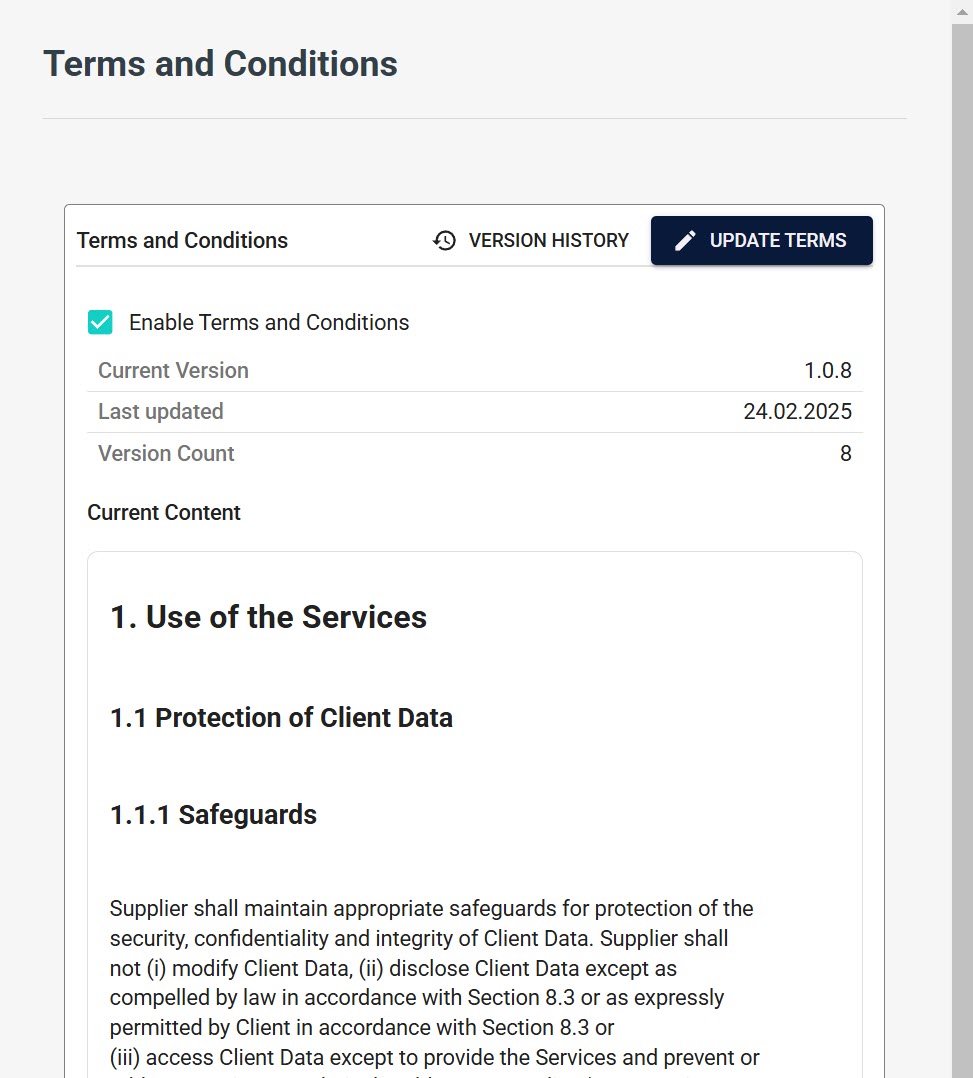
We're introducing a new Terms and Conditions Management system that improves how organizations handle legal agreements and compliance requirements. This feature provides better control over legal documentation while ensuring seamless user experiences and maintaining detailed audit trails.
Organizations can now create, manage, and enforce terms and conditions at the domain level, ensuring that legal requirements are met while providing users with clear, accessible information about their obligations and rights.
Key Features
-
Domain-Level Autonomy
- Enable or disable Terms and Conditions independently for each Domain
- Manage content with complete domain-specific customization
-
Advanced Version Management
- Semantic versioning system (MAJOR.MINOR.PATCH) for clear change tracking
- Complete version history with author attribution and timestamps
- Ability to restore previous versions when needed
- Automatic enforcement of user acceptance for updated terms
-
Intuitive Content Creation
- Rich Markdown editor with real-time preview capabilities
- Structured content support for professional documentation
- Clear formatting options for enhanced readability
- Side-by-side version comparison for easy review
-
Automated Compliance Workflow
- Intelligent user redirection to terms acceptance when required
- Detailed acceptance tracking with timestamps and version details
- Automatic re-acceptance enforcement when terms are updated
- Detailed audit logs for compliance reporting
Impact and Benefits
For Organizations:
- Legal Compliance: Maintain complete records of user acceptance for audit and compliance purposes
- Operational Efficiency: Automate the entire terms acceptance process, reducing administrative overhead
- Risk Management: Ensure all users have accepted current terms before accessing services
- Flexibility: Customize terms per domain to meet specific legal or operational requirements
For Users:
- Transparency: Clear, accessible terms presented in an easy-to-understand format
- Convenience: Streamlined acceptance process that doesn't interrupt workflow
- Clarity: Always know which version of terms you've accepted and when
Implementation Process
When Terms and Conditions are enabled:
- User Access Control: Users must accept current terms before accessing services
- Acceptance Tracking: Every acceptance is recorded with user, timestamp, and version details
- Update Enforcement: When terms are updated, users must re-accept before continued access
- Access Restriction: Services remain inaccessible until terms are properly accepted
The system automatically handles:
- User redirection to terms acceptance pages when required
- Recording of all acceptance events with complete audit trails
- Maintenance of complete version history
- Enforcement of re-acceptance for updated terms
For detailed guidance on implementation and management, refer to our Terms and Conditions Documentation.
Improve your compliance management with automated, transparent, and user-friendly Terms and Conditions handling.
Customizable Credentials List
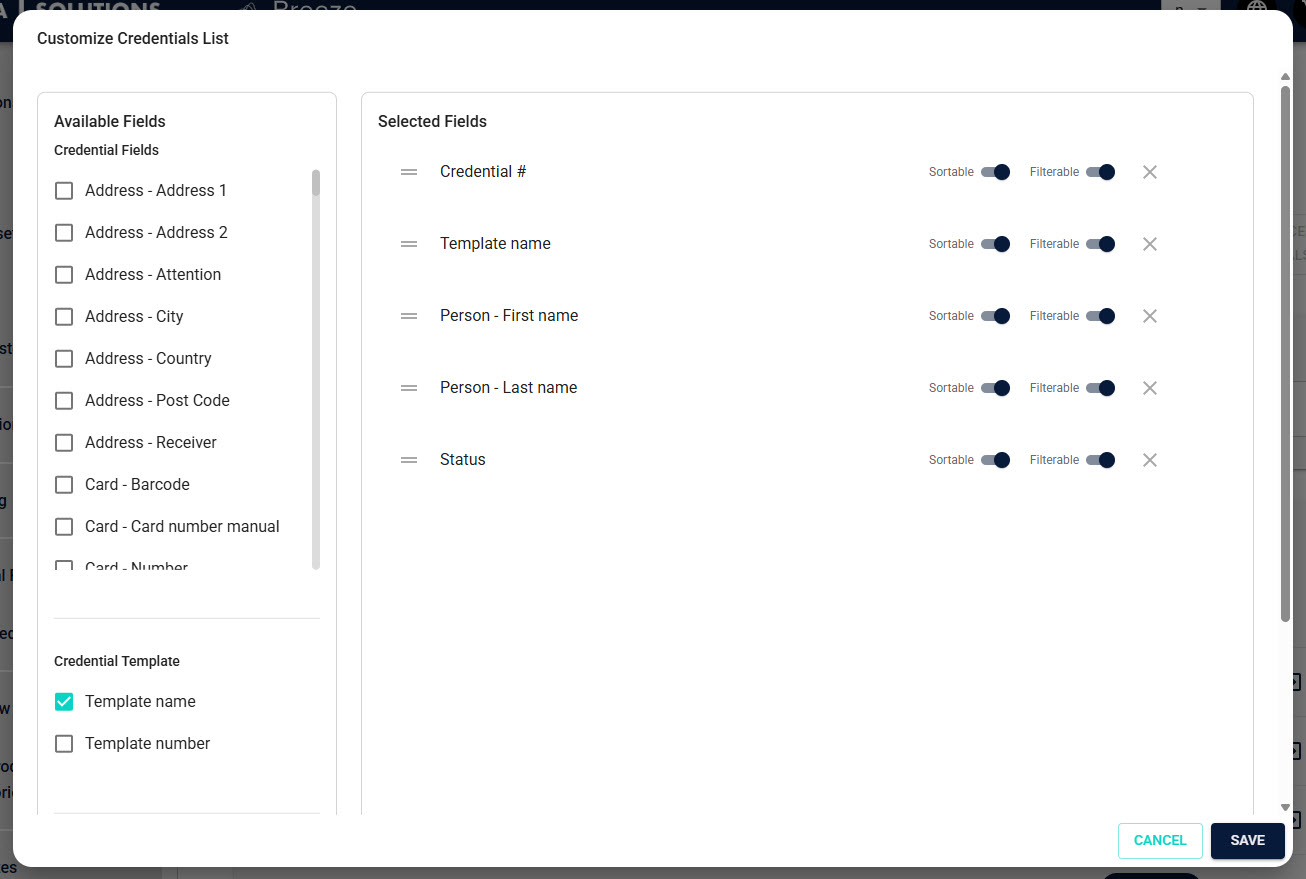
Introducing the Customizable Credentials List feature—a useful addition that allows tenant administrators to create tailored credential management experiences. This feature improves how organizations view and interact with credential data, providing greater control over information presentation and workflow optimization.
Every organization has unique credential management needs, and the one-size-fits-all approach simply doesn't work in today's diverse operational environments. With the Customizable Credentials List, you can finally create views that match your specific requirements, showing only relevant information in the order that makes sense for your team.
Key Features
-
Flexible Field Customization
- Select which credential fields are visible in your list view
- Arrange fields in any order that matches your workflow
- Save configurations at the tenant level for consistent team experiences
- Hide unnecessary fields to reduce visual clutter and improve focus
-
Intelligent Field Categorization
- Credential Information: Core credential data like ID, status, and expiration
- Template Details: Template-specific information and custom fields
- Order Information: Production and delivery-related data
-
Advanced List Management
- Sort by any visible column for improved data organization
- Apply filters based on field values for precise credential searches
- Efficient pagination for handling large credential sets
- Bulk action support for streamlined operations
-
Persistent Configuration
- Settings are saved per tenant for consistent experiences
- Multiple users within a tenant share the same optimized view
- Easy modification of field arrangements as needs evolve
Impact and Benefits
For Administrators:
- Improved Efficiency: Streamlined workflows that show only what matters most
- Faster Training: New team members can quickly understand focused, relevant data
- Better Decision Making: Clear data presentation supports faster, more accurate decisions
- Reduced Errors: Less visual clutter means fewer mistakes and oversights
For Organizations:
- Workflow Optimization: Tailor views to match specific operational processes
- Enhanced Productivity: Teams spend less time searching and more time acting
- Scalable Management: Handle growing credential volumes with optimized interfaces
- Consistent Experience: Standardized views across team members reduce confusion
For Users:
- Reduced Complexity: See only the information relevant to your role and tasks
- Improved Navigation: Logical field arrangements make data easier to find and understand
- Consistent Interface: Reliable, predictable layouts improve user confidence
- Enhanced Performance: Focused views load faster and respond more quickly
Use Cases
- Security Teams: Focus on expiration dates, security levels, and access permissions
- Production Teams: Emphasize production status, delivery information, and timelines
- Administrative Teams: Highlight user information, approval status, and documentation
- Executive Dashboards: Show high-level metrics and status summaries
For detailed implementation instructions and best practices, visit our Customizable Credentials List Documentation.
Improve your credential management with views that work exactly the way you do.
Improvements
Enhanced Credential List Column Management
We've significantly enhanced the credential list interface with intelligent column management capabilities that make working with credential data more intuitive and efficient. These improvements focus on providing users with greater control over their viewing experience while maintaining consistency across sessions.
What's New
-
Interactive Column Resizing:
Users can now resize columns by dragging the divider between column headers, providing immediate control over data visibility and layout optimization. -
Persistent Preferences:
Column size preferences are automatically saved in your browser's local storage, ensuring your customized view remains consistent between sessions and across different credential management tasks. -
Adaptive Display:
Whether working with long credential descriptions or compact identifier codes, the interface now adapts to display data optimally based on your specific needs.
For more details on utilizing these features, refer to our Column Management Documentation.
Advanced Date Filtering in the Credentials List
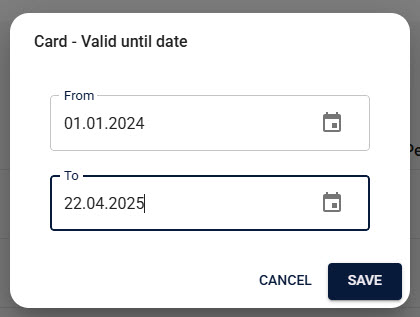
We've introduced a new date filtering system for the Manage Credentials interface, providing administrators with better tools to locate and manage credentials based on precise time ranges. This improvement significantly helps with credential lifecycle management and operational planning.
Key Capabilities
-
Intuitive Date Range Selection:
Set precise date ranges using user-friendly From and To date pickers for any date-based field, including Expiration Date, Creation Date, and Issue Date. -
Flexible Filtering Options:
Apply date filters to multiple date fields simultaneously, enabling complex queries like "credentials created in Q1 that expire in the next 60 days." -
Common Use Cases Made Simple:
- Identify credentials expiring within specific timeframes
- Find all credentials created between particular dates
- Filter out expired credentials from active management lists
- Plan renewal schedules based on expiration patterns
Enhanced Functionality
- Combined Filter Support: Date filters work seamlessly with existing text and category filters for precision searching
- Large Dataset Management: Efficiently handle extensive credential databases with targeted date-based queries
- Operational Planning: Support proactive credential management through expiration forecasting
For detailed filtering techniques and advanced usage, see our Filtering Documentation.
Bug Fixes
Tenant Selection Dialog Overflow and Button Visibility Fix
Fixed: Resolved a critical usability issue where the tenant selection dialog could overflow the screen boundaries, causing essential action buttons to become inaccessible when many tenants were available.
Product Search Functionality
Fixed: Corrected an issue in the "Manage Products" interface where search filters would unexpectedly reset when the browser window lost and regained focus, causing users to lose their filtered results and requiring them to re-enter search criteria.
Production Printer Filtering
Fixed: Resolved application crashes that occurred when filtering credential lists on columns containing null or undefined values, particularly affecting the "Device" field in production environments.
AMR Setup Translation Errors
Fixed: Corrected translation inconsistencies in AMR (Access Management Router) transfer template setup dialogs, ensuring that error messages and interface elements are properly localized across all supported languages.
Production Site Settings Management
Fixed: Resolved issues preventing users from properly removing or modifying local production site settings, ensuring that configuration changes are correctly applied and persisted.
Documentation Updates
We've significantly expanded our documentation to support the new features and improvements in this release:
New Documentation:
- Terms and Conditions (TaC) Overview
- TaC - Administrator Setup Guide
- TaC - Content Management Guide
- TaC - User Acceptance Flow
- TaC - Troubleshooting Guide
- Domain Administration
- Customizable Credentials List Overview
- Credential Management - Data Export Guide
- Credential Management - Using the List View
Enhanced Documentation:
- Updated existing guides with new feature references
- Improved troubleshooting sections
- Added cross-references between related features
- Enhanced search capabilities for better information discovery
These documentation updates ensure you have detailed resources to implement and get the most out of all new features and improvements.