Terms and Conditions Access Issues
Problem
You're being redirected to the Terms and Conditions page and can't access the system, or you're having issues with Terms and Conditions acceptance.
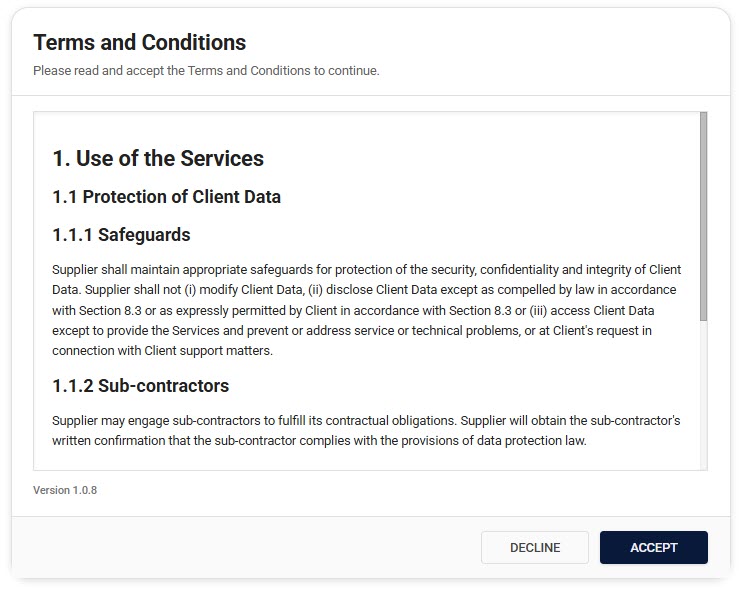
Why This Happens
You'll be redirected to the Terms and Conditions page in these situations:
-
First-time Access
- You've never accepted the Terms and Conditions before
- This is required for all new users
-
Updated Terms
- The Terms and Conditions have been updated
- You need to accept the new version to continue
-
New Domain Access
- You're accessing a different domain
- Each domain requires separate acceptance
Solution
If You're Seeing Terms and Conditions for the First Time
- Scroll through and read the entire document
- Note the version number at the bottom
- Choose your action:
- Click "Accept" to continue to the system
- Click "Decline" if you don't agree (but you won't be able to use the system)
If You've Been Redirected After an Update
- Review what's changed in the new version
- Accept the new terms to regain access
- You'll be automatically redirected to your original destination
If You Declined the Terms
- You'll be logged out of the system
- To regain access:
- Log back in
- Review the terms again
- Accept them to use the system
Verification
You can verify your acceptance status:
- Go to your Account Details page
- Check:
- Which version you've accepted
- When you accepted it
Prevention
To avoid access issues:
- Accept terms promptly when presented
- Review terms carefully before accepting
- Note that you'll need to accept updates when they occur
Common Questions
"Why do I need to accept again?"
- Terms have been updated
- You're accessing a new domain
- Your previous acceptance wasn't recorded
"What happens if I decline?"
- You won't be able to access the system
- You can return later to accept
"Can I use the system without accepting?"
No, accepting the Terms and Conditions is mandatory for system access.
Still Having Issues?
If you continue to experience problems:
-
Try these steps:
- Clear your browser cache
- Log out and back in
- Try a different browser
-
Contact support with:
- The domain you're trying to access
- The version number you're seeing
- Any error messages
- Screenshots if possible
Need Help?
Contact:
- Your system administrator
- Technical support
- Your organization's legal team (for questions about the terms themselves)