v1.9.5.0

Elevating Efficiency with Breeze v1.9.5.0
The latest release of Breeze, v1.9.5.0, is here—and it’s all about adaptability, usability, and helping you achieve more with less effort. Packed with refinements, new tools, and smarter workflows, this release reflects our ongoing focus on delivering solutions that meet the evolving needs of modern organizations.
This isn’t just about adding features; it’s about solving challenges, simplifying processes, and creating a platform that works the way you need it to.
Empowering Organizations with Flexibility
Every organization operates differently, and this release emphasizes flexibility at its core. From customizable checkout flows to dynamic production settings, the updates in v1.9.5.0 allow you to tailor Breeze to your exact requirements.
Whether you’re managing complex credential production workflows or fine-tuning integrations with external systems, these enhancements are designed to help you work smarter.
Seamless Integration for a Connected Ecosystem
Integration isn’t just a technical requirement—it’s the key to operational harmony. With new tools like AMR File Synchronization and advanced SSO management, v1.9.5.0 ensures Breeze fits seamlessly into your broader ecosystem.
These improvements go beyond simple compatibility. They empower organizations to keep systems in sync, automate user management, and streamline data-sharing, helping you stay focused on what matters most.
Simplifying the Complex
Modern organizations face increasing complexity, but Breeze aims to make that easier to manage. Automations introduced in this release—like lifecycle management for inactive accounts and tools for automated credential synchronization—help reduce manual effort while maintaining precision.
For production teams, streamlined workflows and localized customization options ensure efficiency without sacrificing control.
A Platform for Everyone
Breeze v1.9.5.0 also brings greater accessibility and inclusivity. With new language support and AI-powered translation tools, the platform now serves a broader, more global audience. These updates reflect our commitment to ensuring Breeze is usable and intuitive, no matter where you are or how your organization operates.
Built for the Future
With this release, we’ve focused not just on addressing today’s needs but on preparing for tomorrow’s challenges. Redesigned interfaces, smarter automations, and scalable integrations make Breeze v1.9.5.0 a platform that grows with your organization.
Every feature has been designed to simplify workflows, enhance security, and improve usability, all while maintaining the flexibility to adapt as your needs evolve.
Breeze v1.9.5.0 is a step forward in making access management and credential production more intuitive and efficient. With thoughtful enhancements and a focus on usability, this release is about helping you work better—whether you’re managing a small team or a global operation.
Explore the latest features and see how Breeze can empower your organization to do more.
Summary of Changes
New Features
- DOCS!
- AMR File Synchronization
- Configurable Tenant Checkout Flows
- AI-Powered Field Translations
- SSO User Onboarding
- SSO Role Management
- Custom SSO Route
- Order Lock for Tenants
- Re-Send Duo ID Requests
- Automatic Expiry of Inactive Registered Users
- Configurable Quality Check Step After Production
- Finnish and Danish Translations
Other Changes
- Enhanced Card Template Configuration Module
- Customizable Card Job Delay
- Configurable Print Device Access in Card Templates
- Credentials in Delivery Lists Sorting
- Updated Role Requirements for RFID Data Export
- Automatic Cleanup of Incomplete Duo ID Requests
- Attention Field Character Limit
- Security Updates
Bug Fixes
New Features
DOCS!
We are thrilled to introduce our new Documentation pages (which you're currently reading)!
This redesigned website offers a comprehensive guide to using Breeze, featuring detailed instructions, tutorials, and troubleshooting tips. With intuitive navigation and robust search capabilities, finding the information you need is now easier than ever.
Please note that the site is a work in progress; we will continue to add fresh content and features. Your feedback and suggestions are highly appreciated!
The DOCS are also accessible directly from within the Breeze platform where relevant, allowing you to effortlessly reference them while using the app.
We hope you find the new Documentation site both helpful and informative.
AMR File Synchronization
We are pleased to announce AMR File Synchronization, a robust addition to the Access Management Router (AMR) that enables seamless, automated data exchange between Breeze and external systems. This feature offers a flexible and secure way to share Credential data, allowing organizations and vendors to develop integrations customized to their specific access management requirements.
What is AMR File Synchronization?
AMR File Synchronization provides a secure means to transfer Credential data—such as RFID numbers, unique identifiers, and other access-related details—to external systems. It allows organizations to keep their third-party systems consistently updated, whether for physical access control (PACS), identity management, or other operational purposes.
While this functionality can be utilized for straightforward file imports, it is primarily designed to assist vendors in developing robust, automated integrations with their systems.
Thanks to its built-in automation, any updates to Credential data immediately trigger synchronization, ensuring your third-party systems always possess the latest information.
How Does It Work?
-
Automated Data Transfer:
Credential data is synchronized automatically, triggered by key events such as the creation, activation, deactivation, or deletion of Credentials. -
Flexible Data Configuration:
Organizations can customize which data fields to share, ensuring only relevant and necessary information is transferred. -
Support for Credential Images:
Images, such as photos or signatures, can be included in the transfer—either as separate files or embedded directly in the data file. -
Secure Delivery:
Data is stored and transferred via Azure File Share, leveraging secure infrastructure to protect sensitive information.
Why This Matters
-
Empowers Vendor Integrations:
Offers a versatile platform for third-party vendors to develop customized integrations, improving Breeze's interoperability within extensive operational ecosystems. -
Streamlined Access Management:
Simplifies and automates the process of keeping external systems synchronized with Credential data. -
Enhanced Efficiency:
Reduces manual effort and potential errors, freeing up time and resources for more critical tasks. -
Customizable and Scalable:
- Select and configure data fields to align with third-party system requirements.
- Designed to scale with enterprise-level access management needs.
-
Secure and Compliant:
Ensures data integrity and compliance with high security standards through Azure's robust storage and transfer mechanisms.
Benefits for Organizations
- Real-Time Synchronization: Keeps third-party systems updated as Credential data changes, ensuring smooth operations.
- Future-Proof Integrations: Provides a foundation for creating advanced, vendor-specific integrations tailored to unique business needs.
- Operational Efficiency: Automates data synchronization, reducing IT overhead and ensuring data accuracy.
- User Satisfaction: Ensures that external systems are always in sync, supporting seamless access for employees, contractors, and visitors.
For more information, visit the AMR File Synchronization Documentation.
Streamline and elevate your access management processes with AMR File Synchronization!
Configurable Tenant Checkout Flows
We are excited to introduce Configurable Tenant Checkout Flows, allowing each Tenant to tailor their checkout process to their specific operational requirements. This feature lets Tenants choose from four different checkout flows to enhance order management and optimize production workflows.
What Are Checkout Flows?
Checkout flows define how orders progress from adding items to the cart through to production. The four available flows—Default, On-the-Fly, Scheduled, and Merge—offer flexibility to suit various use cases, from manual checkout to fully automated processes.
Key Features
-
Default Checkout:
The traditional cart-based flow where users manually review and place orders. -
On-the-Fly Checkout:
Automatically processes orders as soon as credentials are created, bypassing the cart entirely. Ideal for local production or scenarios requiring immediate action. -
Scheduled Checkout:
Automatically processes all open carts at scheduled intervals. Perfect for API-integrated users or those handling bulk orders. -
Merge Checkout:
Queues orders and merges them based on defined criteria (e.g., by user, delivery settings, or static configurations), reducing processing overhead and optimizing shipping.
Why This Matters
-
Tailored Workflows:
Each Tenant can select the flow that aligns with their operations, whether they need flexibility, automation, or consolidated order handling. -
Operational Efficiency:
Automating processes like scheduled checkouts or merging reduces manual intervention, saving time and resources. -
Cost Optimization:
Features like merging orders allow Tenants to consolidate shipping and production efforts, lowering costs. -
Enhanced User Experience:
Customize workflows for different roles or user types within the Tenant, ensuring everyone interacts with the system in the most effective way.
Benefits for Organizations
- Customization: Provides Tenants with the autonomy to configure workflows that suit their needs.
- Automation: Reduces manual effort by automating processes like order processing and consolidation.
- Streamlined Operations: Ensures smoother transitions between order placement, production, and shipping.
- Cost Savings: Optimize shipping and processing with merge options.
For detailed information on each checkout flow and its use cases, visit the Tenant Checkout Flows Documentation.
AI-Powered Field Translations
We are delighted to introduce AI-Powered Field Translations, a powerful new feature designed to save time and effort when creating Credential Templates in multiple languages.
What’s New?
-
Effortless Translations:
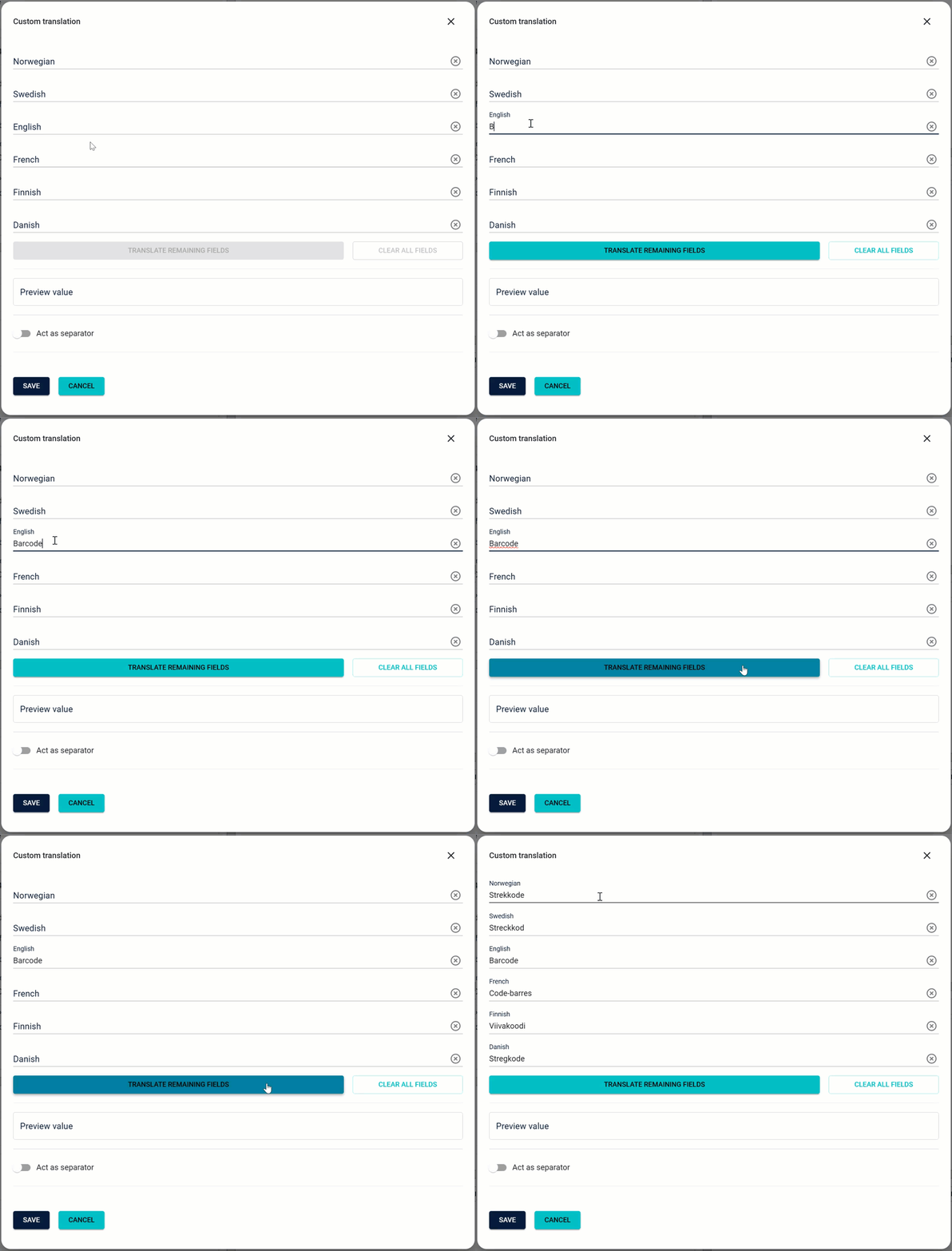
Users can now translate custom data fields in Credential Templates with ease. Enter a translation for one field, and the system will automatically generate translations for the remaining fields with just a single click. -
Separator Translation:
In addition to fields, separators can also be translated using this feature, ensuring a consistent and localized experience across all elements.
This functionality is available directly from the Fields Settings on any Template Configuration page, seamlessly integrating into your workflow.
Why It’s Useful
- Time-Saving: Automates translations, reducing the manual effort required for multi-language Credential Templates.
- Consistent Results: Ensures translations are uniform and professional across all fields.
- Simplified Workflow: Makes multi-language setup fast and hassle-free.
SSO User Onboarding
We are introducing SSO User Onboarding, a feature that simplifies user addition and management in Breeze using existing credentials from platforms like Azure AD / Entra ID. Users can log in effortlessly with their company accounts, eliminating the need to remember another password. This also enforces company-wide security policies, including Multi-Factor Authentication (MFA), ensuring a consistent and secure login experience.
For administrators, this means less manual setup, reduced errors, and faster onboarding, while providing a seamless and professional experience for users. By leveraging your organization's existing identity systems, you enhance compliance, strengthen security, and simplify user management at scale.
Key Highlights
-
Automatic User Creation:
- Automatically create new users when they log in via SSO, eliminating the need for manual account setup.
- Supports both static and dynamic mapping for assigning users to tenants.
-
Static Mapping:
Assign all new users to a single, pre-defined tenant. Ideal for organizations with simple tenant structures. -
Dynamic Mapping:
Dynamically assign users to tenants based on attributes in the IdP response (e.g., department). This allows for greater flexibility and granular control. -
Fallback Handling:
Users without a valid mapping or missing IdP attributes are assigned to a fallback tenant, ensuring no interruptions in access. -
Role Assignment:
Assign roles to users upon creation. Configure static roles or use IdP attributes for dynamic role assignment. -
Account Uniqueness:
Option to enforce only one active account per user across tenants, ensuring streamlined and conflict-free user management.
Benefits
- Seamless Onboarding: Users can log in and be onboarded automatically with no manual intervention.
- Flexibility for Complex Organizations: Dynamic mapping supports diverse organizational structures.
- Simplified Management: Automate user assignment and role allocation for consistent and error-free setup.
- Reduced Administrative Overhead: Minimize the workload for administrators with automated processes.
For detailed guidance on setup and configuration, refer to the SSO User Onboarding Documentation.
This enhancement transforms the user management process, making it faster, more efficient, and easier to scale!
SSO Role Management
We are excited to introduce SSO Role Management, enabling organizations to automate user role assignment and updates in Breeze based on identity provider (IdP) credentials. This enhancement simplifies user management, ensures appropriate access control, and reduces administrative overhead by leveraging existing role configurations in platforms like Azure AD / Entra ID.
Key Highlights
-
Automated Role Assignment:
- Users logging in via SSO are automatically assigned roles based on their IdP credentials.
- Default roles like
Usercan be assigned or updated dynamically according to specific IdP attributes.
-
Dynamic Role Mapping:
- Map roles in the IdP to corresponding roles in Breeze for precise access control.
- Changes in the IdP are reflected in Breeze during the user’s next login.
-
Advanced Role Settings:
- SSO Max Role: Limit the highest role level the IdP can assign.
- Strict Role Management: Ensure all roles are managed exclusively via the IdP, preventing manual role changes in Breeze.
- Restricted Roles: Define roles that cannot be assigned by the IdP for enhanced control.
Benefits for Organizations
- Streamlined User Management: Reduce manual intervention by automating role assignments and updates.
- Consistency Across Systems: Ensure role alignment between Breeze and your organization’s IdP.
- Enhanced Security: Strict controls and restrictions prevent unauthorized role escalation.
- Time-Saving: Eliminate repetitive tasks and errors associated with manual role configuration.
Why It Matters
With SSO Role Management, organizations can effortlessly assign the right roles to the right users, ensuring they have the permissions they need—no more, no less. This feature enhances security, streamlines operations, and provides flexibility to tailor user access in a way that aligns perfectly with your organization's structure and policies.
For detailed instructions on setup, visit the SSO Role Management Documentation.
Simplify access control and boost efficiency with SSO Role Management!
Custom SSO Route
Introducing the Custom SSO Route feature in Breeze, designed to provide a more intuitive and personalized login experience for organizations using Single Sign-On (SSO). This enhancement allows organizations to create a unique and branded URL for users to log in using SSO, enhancing the login process and aligning it with the organization’s identity.
Key Highlights
-
Personalized Login URLs:
Organizations can now create a unique and branded URL for their users to log in via SSO. For example, instead of the default login flow, users can access SSO directly athttps://breeze.idportal.no/sso/mycompany. -
Streamlined Login Experience:
Users no longer need to enter their email address on the Breeze login page before being redirected to the identity provider (IdP). The custom route simplifies and accelerates the login process. -
Unique and Secure:
Custom routes are exclusive to each organization, reducing the risk of conflicts. Organizations are encouraged to use a value that represents their brand while adhering to naming guidelines.
Benefits for Organizations
-
Enhanced User Experience:
A seamless, branded login process makes accessing Breeze simpler and more professional for users. -
Improved Efficiency:
Direct SSO login reduces unnecessary steps, saving time and effort. -
Brand Representation:
Customized routes align the login experience with your organization’s identity.
For detailed instructions on setup, refer to the Custom SSO Route Documentation.
Make your login experience intuitive, professional, and uniquely yours with Custom SSO Routes!
Order Lock for Tenants
The Order Lock feature is now available to help streamline order management and ensure configurations are complete before processing begins. With this enhancement, System Administrators can prevent Tenants from placing orders until their setup is finalized and verified, offering a robust quality assurance step for smoother operations.
Key Highlights
-
Enhanced Control:
System Administrators can activate the Order Lock in Tenant Settings to temporarily restrict order placement until all necessary configurations, such as Tenant and Credential Template setups, are complete and verified. -
Production Site Integration:
Order Locks can also be applied at the Production Site level, ensuring all new Tenants associated with a site are automatically restricted from placing orders until configurations meet the required standards. -
Purpose-Built Assurance:
By preventing orders during incomplete or incorrect setups, the Order Lock feature reduces the risk of processing errors, ensuring a higher quality of service and a more seamless production workflow.
Users Will Be Notified
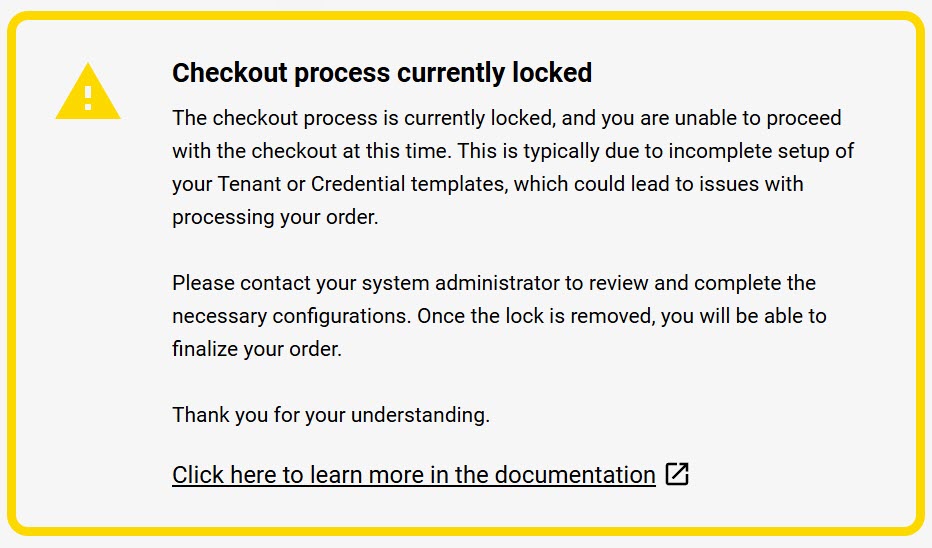
When the Order Lock is active and a user attempts to place an order, they will receive a clear notification in the application.
The message will be displayed in the user's preferred language, ensuring clarity and accessibility for all users.
Users Can Still Prepare Orders
Even when the Order Lock is active, users can continue to add items to their cart, which will be saved until the lock is removed. This allows users to fully prepare their orders, ensuring they can proceed with checkout immediately once configurations are finalized and the lock is disabled.
How It Benefits You
- Fewer Errors: Prevents processing delays or quality issues caused by incorrect configurations.
- Time Savings: Minimizes back-and-forth by ensuring orders are only placed when ready.
- Improved Communication: Users are notified immediately if their checkout process is locked, reducing confusion and enabling them to address issues promptly with their administrators.
- Streamlined Efficiency: Creates a smoother, more reliable order management experience for all parties.
For detailed guidance on enabling and using Order Lock, read the DOCS:
Re-Send Duo ID Requests
We are simplifying the process for users to address and correct rejected Duo ID requests with our latest update. Approvers now have the option to re-send rejected requests directly back to the end-user or collaborator, ensuring a smoother and more efficient approval process.
What’s New?
-
Effortless Re-Sending:
Approvers can now check a "Resend" option when rejecting a Duo ID request. This allows the rejected request to be sent back to the user for corrections without restarting the process. -
Clear Communication:
Users will receive a new email specifically tailored for rejected requests. This email clearly explains that the request was rejected and provides a link to update and resubmit their request. -
Rejection Reason Displayed:
The rejection reason will now appear on the Duo ID registration page, so users know exactly what needs to be fixed. -
Seamless Workflow:
All previously submitted data and photos remain intact, making it quick and easy for users to correct and resubmit their requests.
Why It Matters
This enhancement reduces back-and-forth communication and minimizes delays caused by unclear rejections. Users can easily address issues and get their Duo ID requests approved faster, saving time and effort for everyone involved.
A win-win for efficiency and user satisfaction!
Automatic Expiry of Inactive Registered Users
We are introducing Automatic Expiry of Inactive Registered Users, a Life Cycle Management feature in Breeze that helps maintain a clean database and supports compliance with GDPR policies. This initial release focuses exclusively on managing Registered Users, allowing organizations to automatically remove users who register but never activate their accounts.
Key Highlights
-
Automatic Deletion of Inactive Accounts:
Registered users who do not activate their accounts within a specified timeframe will be automatically deleted. -
Email Notifications for Transparency:
- A first warning email will be sent a specified number of days before deletion.
- A final warning email will be sent closer to the deletion date, giving users one last opportunity to activate their account.
- Optionally, a confirmation email can be sent upon deletion.
-
Customizable Timelines:
Administrators can configure:- The number of days before inactive accounts are deleted.
- Timing for warning emails.
- Whether to enable or disable email notifications entirely.
-
Tenant-Specific Control:
While default settings are applied at the domain level, tenants can customize their own Life Cycle Management configurations to meet their specific needs.
Benefits for Organizations
- Improved Database Hygiene: Automatically remove inactive accounts, keeping your system organized and efficient.
- GDPR Compliance: Ensure compliance with data retention and privacy policies by managing user lifecycle effectively.
- Reduced Administrative Overhead: Automate the process of identifying and removing inactive accounts.
- Enhanced User Communication: Transparent email notifications keep users informed about the status of their accounts.
For more details and step-by-step setup instructions, visit the Life Cycle Management Documentation.
Keep your system clean, compliant, and efficient with Automatic Expiry of Inactive Registered Users!
Configurable Quality Check Step After Production
Production Sites now have the option to enable or disable the Quality Check Step After Production, providing flexibility to adapt workflows based on operational needs.
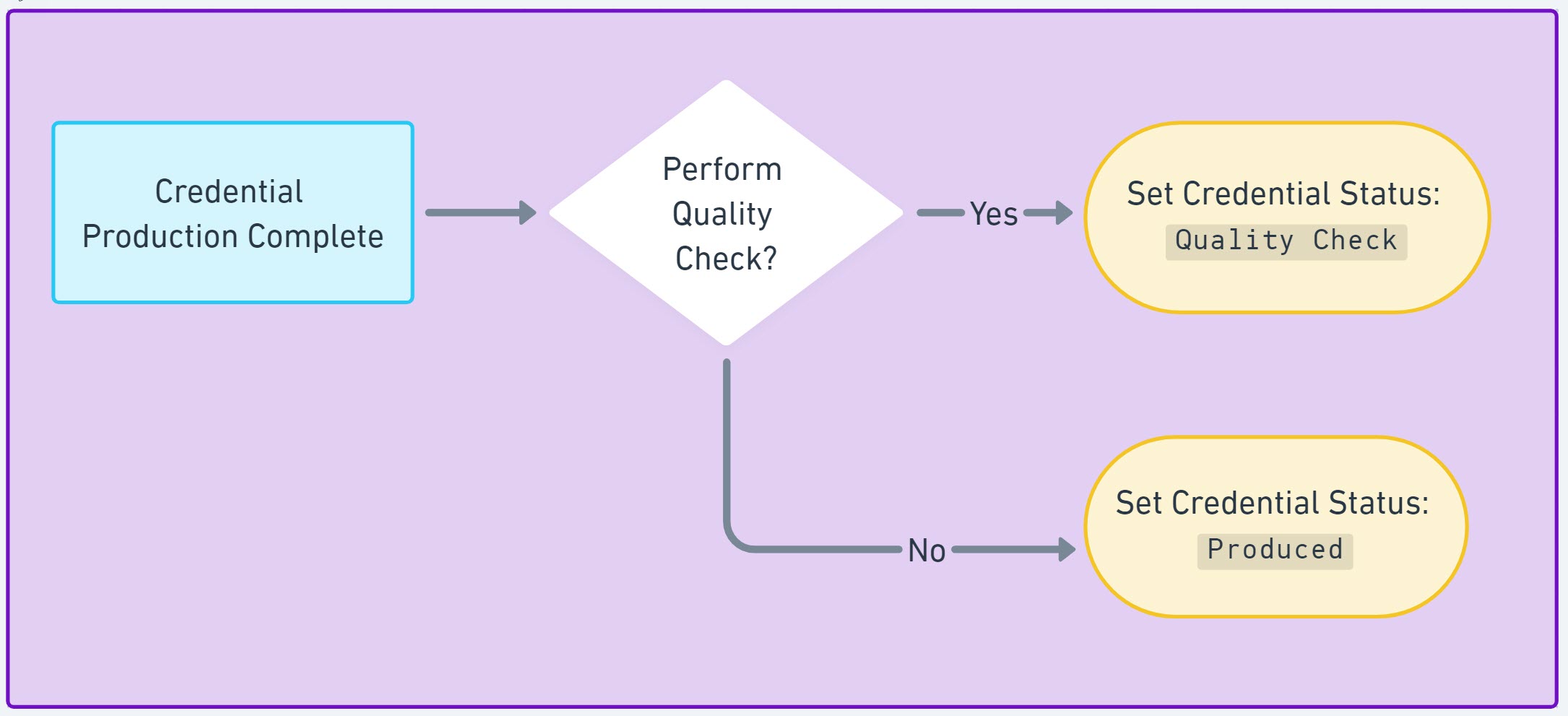
The Quality Check step is a stage in the credential production process that requires a user with the Quality Inspector role to review and approve each credential before it is marked as Produced. This step ensures that credentials meet quality standards and are ready for delivery or deployment.
By default, the Quality Check step is enabled for all Production Sites but can now be disabled for sites where this level of oversight may not be necessary, such as smaller or highly streamlined operations.
Key Details
-
Quality Check Step:
When enabled, credentials must be reviewed and approved by a user with theQuality Inspectorrole before being marked asProduced. -
Configurable Settings:
System Administratorscan toggle this step in the Production Site Settings, allowing smaller or highly automated production sites to skip this step if not required.
Benefits
- Customizable Workflows: Tailor the production process to meet specific site requirements.
- Efficiency for Smaller Sites: Bypass unnecessary steps to save time and resources.
- Quality Assurance: Maintain high standards for larger operations where oversight is crucial.
For more information, visit the Production Site Documentation.
Finnish and Danish Translations
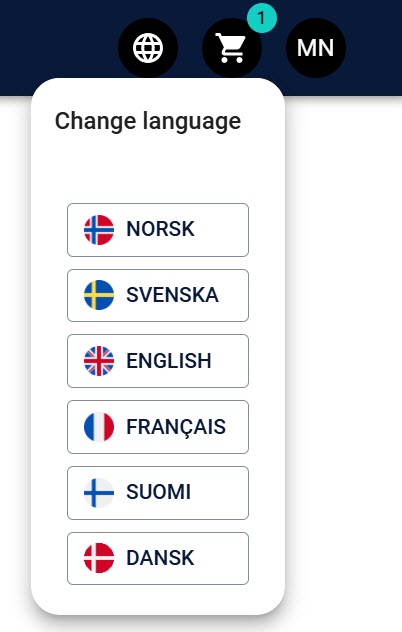
Breeze now supports Finnish and Danish languages, enabling users in these regions to interact with the app in their native language.
The language settings can be changed from the menu in the top right corner of the app.
Other Changes
Enhanced Card Template Configuration Module
The Card Template Configuration module has been reworked to provide a more intuitive and user-friendly interface. As more features and settings have been introduced, this update ensures the module remains organized and easy to navigate.
What’s New?
-
Streamlined Interface:
Options and settings are now grouped into clearly defined sections or tabs, reducing clutter and enhancing usability. -
Improved Navigation:
The reorganized layout makes it easier for users to locate and configure the features they need efficiently. -
Future-Ready Design:
This refactor lays the groundwork for accommodating additional features while maintaining a clean and accessible interface.
Customizable Card Job Delay
Production sites and tenants with local production can now customize the delay between card jobs directly within the Production Module.
Details:
- The delay between each card job, previously fixed or set on the device, can now be adjusted locally on a per-computer basis.
- This setting is stored in Local Storage, ensuring it applies only to the current machine without impacting other devices or users.
- A new dialog in the Production Module allows users to configure the custom delay.
- If a custom delay is set (non-zero), it will override any device-based delay settings.
Benefits:
- Greater Flexibility: Customize delays to match your local production needs.
- Improved Workflow: Fine-tune timing to optimize production efficiency.
- Localized Settings: Adjustments are confined to the specific computer, maintaining consistency across the broader production environment.
Configurable Print Device Access in Card Templates
We have added the ability to specify which print devices are available in card templates for each domain. This configuration can be managed by the Breeze Team, allowing for tailored whitelisting or blacklisting of devices. This feature provides greater control over the printing process, ensures that only approved devices are used for card production, and minimizes the list of available devices for users to choose from.
Credentials in Delivery Lists Sorting
Credentials on Delivery Lists are now sorted by Last Name (if available) and then by Credential Number. The same sorting is applied to the Quality Check List, improving organization and ease of use.
Updated Role Requirements for RFID Data Export
The role level required to export RFID data has been changed from System Administrator to Super Administrator. This adjustment allows users with lower-level access to export RFID data without granting them higher-level system permissions. Users still need the Data Exporter role to perform the export.
The RFID Export button is available on the Manage Credentials page.
Automatic Cleanup of Incomplete Duo ID Requests
We have introduced an automated cleanup feature to ensure the system remains organized and free from incomplete Duo ID requests.
What’s New?
-
Automatic Cleanup:
Duo ID requests that remain incomplete for 30 days (default setting) will be automatically and permanently deleted if their status is stillDuo ID Requested. -
Enhanced Communication:
The validity of the Duo ID request link is clearly mentioned in the notification email sent to the requester, helping users manage their requests within the allowed timeframe.
Benefits
- System Maintenance: Keeps the system clutter-free by removing outdated and unused requests.
- Improved Efficiency: Reduces administrative overhead by automating cleanup.
- Clear User Expectations: Ensures users are informed about the validity period of their requests upfront.
Attention Field Character Limit
The character limit for the Attention field in Addresses has been restricted to 50 characters. This change ensures appropriate use of the field and limits potential errors or display issues.
Security Updates
This update includes package security enhancements to ensure the system remains secure and protected from vulnerabilities.
Bug Fixes
Several Bug Fixes
This update includes several fixes to address issues reported by users:
-
Approval Requests Not Displaying for Users: When delegating Approval Requests to Tenants further down or outside the Tenants' tenant tree, requests were not displaying for users without access to the origin Tenant. This issue has been resolved, and all users with the appropriate permissions will now see the requests in their Approval List.
-
Deactivated Users Not Displayed in User List: Deactivated users were not visible in the User List. This issue has been fixed, and deactivated users are now displayed correctly.
-
Select Button Not Visible in Tenant Selector: If a user had many Tenants, the "Select" button in the Tenant Selector was not visible. This issue has been corrected, and the button now displays properly.
-
Ctrl+Click on a User in User List Did Not Open in a New Tab: Users can now open user details in a new tab by using Ctrl+Click, resolving the previous issue.
-
Saving Field Translations Did Not Always Work: In some cases, saving translations for fields did not work as expected. This issue has been fixed, and translations are now saved correctly.
-
Re-ordering Credentials in the Cart: There were issues with re-ordering Credentials added to the cart but not yet ordered. This problem has been resolved.