v1.9.9.0

Breeze v1.9.9.0 introduces email delivery tracking and improved Mobile ID management with STid v3 API integration. You'll also see improvements to template management and a new role for controlled data updates.
What this release gives you
With Email History and delivery status tracking, you can see exactly what happens to Duo ID invitation emails and other Credential-related messages. Real-time status updates show whether emails were delivered, opened, or bounced—eliminating guesswork and reducing support tickets. Mobile ID management now uses the STid v3 API with improved lifecycle workflows, making provisioning, revocation, and synchronization more reliable. Meanwhile, template improvements and the new Data Change Operator role give administrators better tools for maintaining accurate Credential data.
Summary of Changes
New Features
Improvements
- Mobile ID Management with STid v3 API
- Data Change Operator Role
- Improved Template Copy Management
- Improved Mobile Credential UI
- Email Status Display Clarifications
- AMR SQL Column Type Compatibility
Bug fixes
New Features
Email History and Delivery Status Tracking
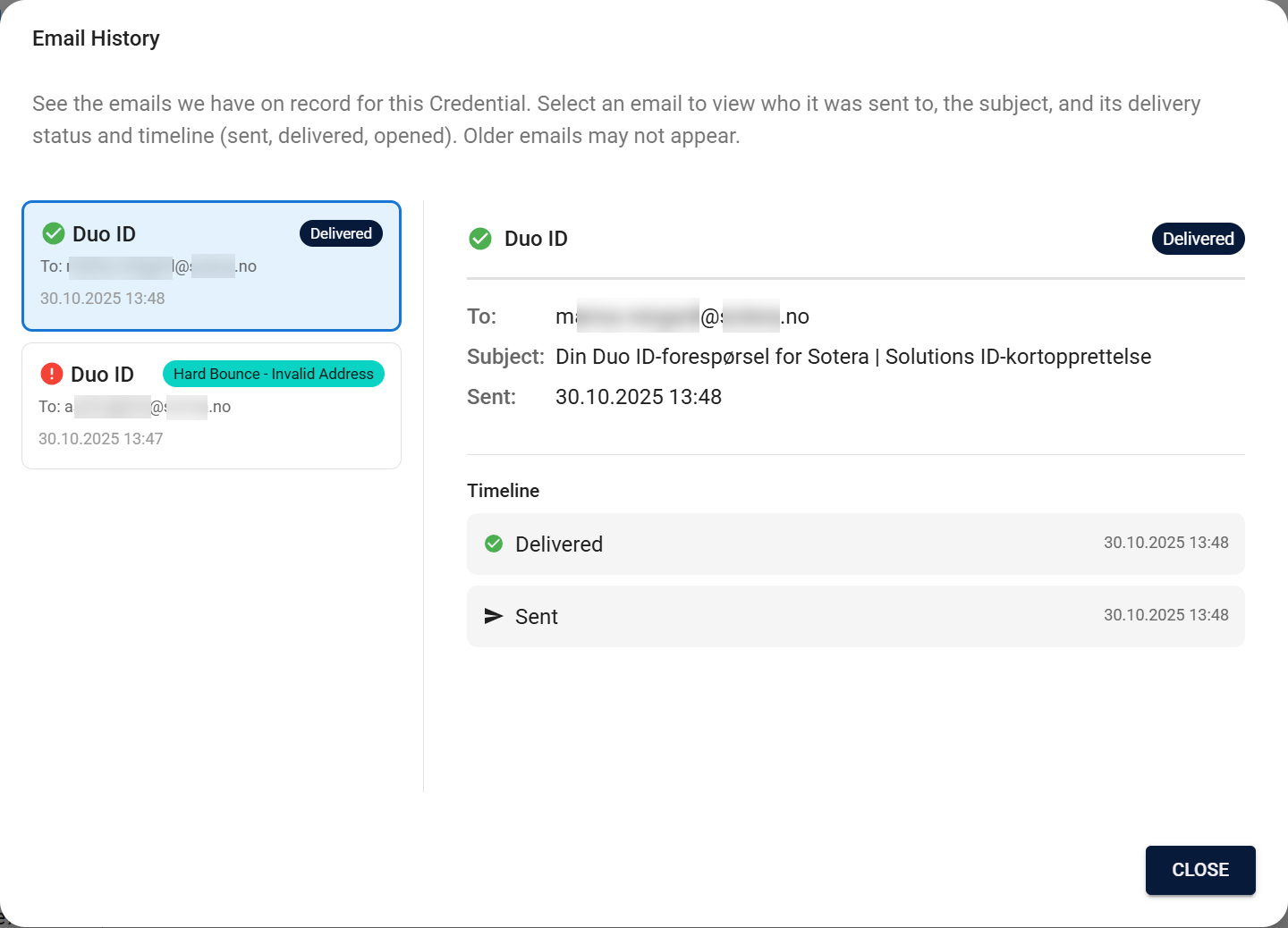
Breeze now includes an Email History dialog that shows all emails sent by Breeze for a Credential, with complete delivery timelines and status tracking. Think of it as your email delivery audit trail—you can see exactly what was sent, when it was sent, and whether it successfully reached the recipient.
Highlights:
- Master-detail dialog layout showing email list (up to 100 most recent) and detailed timeline view
- Complete email lifecycle tracking with event progression (Sent, Delivered, Opened, Clicked)
- Visual status indicators distinguishing terminal statuses (Delivered, Hard Bounce, Marked as Spam) from active statuses (Queued, Sent, Soft Bounce)
- Automatic status updates via webhook integration with 1-2 minute latency
- Daily reconciliation workflow to catch missed status updates
- Shows email metadata (recipient, subject, timestamps, status) without email body content for privacy
- Email retention for 365 days with automatic cleanup
- Button appears only when Breeze emails exist for the Credential
- Available for all Credential types (currently focuses on Duo ID invites but designed for any Breeze-generated emails)
- Does not show third-party emails (like Mobile ID issuance emails from STid provider)
Why it matters:
- Eliminates the "black box" problem where users had no visibility into email delivery
- Reduces support tickets by letting users see delivery status and troubleshoot independently
- Provides complete audit trail for email communications related to Credentials
- Enables faster diagnosis when emails don't reach recipients (bounce, spam, blocked statuses)
- Shows engagement events (Opened, Clicked) to confirm recipient interaction with Duo ID invites
Learn more: Email History documentation
Improvements
Mobile ID Management with STid v3 API
Mobile ID management has been upgraded to use the STid Mobile ID v3 API with improved lifecycle workflows and better state management. This migration provides more reliable provisioning, revocation, and synchronization operations.
- Complete migration from legacy API to STid Mobile ID v3 API
- Better lifecycle management with clearer state transitions (Inactive, Active, Deactivated)
- Improved workflow system for provisioning, revocation, deletion, and synchronization
- Template synchronization with schedule configuration and manual trigger options
- Better connection testing with username/password support and skip site validation option
- Better handling of vCard status during deletion and revocation operations
- Template sync management with global and per-template settings
- Legacy template migration support for smooth upgrades
Why it matters:
- More reliable mobile Credential operations through modern API integration
- Clearer lifecycle states help you understand Credential status at a glance
- Improved error handling and status visibility during provisioning and revocation
- Better synchronization keeps templates and Credentials aligned with the provider
Learn more: Mobile Credential Lifecycle documentation
Data Change Operator Role
Administrators can now assign a new Data change operator role that allows controlled updates to Credential data after creation. This role enables corrections to person information, photos, and contact details while maintaining proper access controls and audit trails.
- Allows controlled corrections to Credential information after creation
- Update data collections linked to Credentials (person names, photos, contact details)
- Edit person information fields with confirmation dialogs
- View Credential modification history
Improved Template Copy Management
Card templates now support copying with external reference preservation and background removal settings. Mobile Credential templates include better sync management capabilities.
- Card template copy now preserves external references when needed
- Background removal settings preserved during template copy
- Mobile Credential template synchronization with schedule configuration
- Improved template search and filtering
Improved Mobile Credential UI
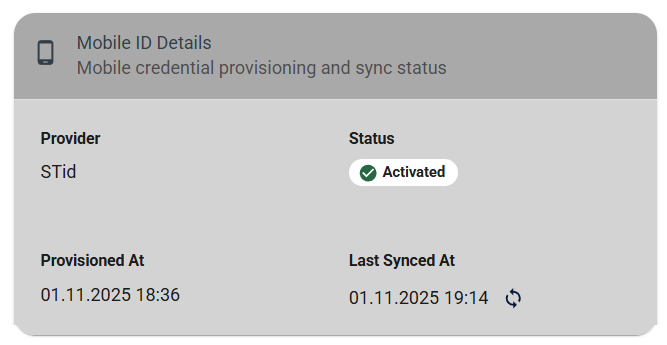
The Credential detail page now includes a dedicated Mobile ID section with connection status, template sync indicators, and workflow links. The mobile Credential provisioning and revocation dialogs have been refactored for better usability.
- Mobile Credential section component on Credential detail pages
- Connection status cards for mobile providers
- Template sync status indicators
- Refactored provisioning and revocation dialogs
Email Status Display Clarifications
Email status labels are now clearer and more accessible across all supported languages. Visual indicators use color-coded backgrounds to distinguish statuses at a glance.
- Improved email status handling and timeline labels
- Visual indicators for different email statuses with color-coded backgrounds
- All email-related UI elements support internationalization
AMR SQL Column Type Compatibility
When AMR SQL Synchronization or SQL Transfer creates new columns using schema management (create_update mode), string columns now default to NVARCHAR(500) instead of NVARCHAR(MAX). This improves compatibility with systems that have limitations with MAX-length columns.
- New columns created automatically now use
NVARCHAR(500)for string data types - Only affects new columns created via schema management
- Existing columns remain unchanged
Bug fixes
Table Pagination Translation
The "Rows per page" label in table pagination controls is now properly translated across all supported languages.