User Acceptance Flow
When you enable Terms and Conditions for your domain, users will need to accept them before accessing your services. This guide explains how the acceptance process works and how to manage it effectively.
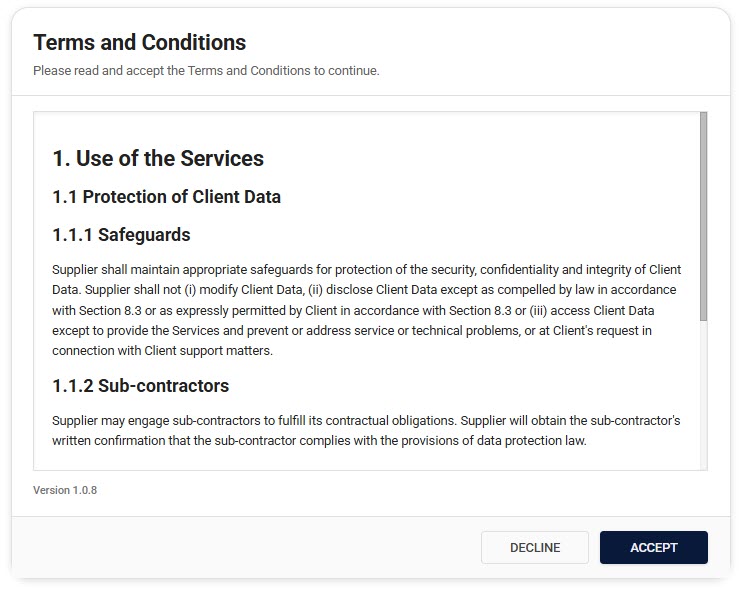
How Users Experience Terms and Conditions
First-Time Users
When a new user tries to access your service for the first time, here's what happens:
- The system automatically checks if they've accepted your terms
- Since they haven't, they'll be redirected to the Terms and Conditions page
- The page presents:
- The current version of your terms
- The date they were last updated
- Accept and Decline buttons
Once the user accepts the terms, they'll be:
- Automatically redirected to their original destination
- Able to use your services normally
- Recorded in the system as having accepted that version
Existing Users and Updates
When you update your Terms and Conditions, here's what happens:
- The next time a user tries to access any page in your service, they'll be automatically redirected to the Terms and Conditions page
- They'll see:
- The new version of the terms
- Options to accept or decline
This ensures users are aware of changes before they can continue using the service.
Managing Multiple Domains
If your organization has multiple domains, each can have its own Terms and Conditions. Here's how it works:
Each domain maintains separate:
- Terms and Conditions content
- Version history
- Acceptance records
This means users might need to accept different terms for different domains. When accessing a new domain or when terms have been updated, they'll be redirected to accept the terms for that specific domain.
The User Interface
Terms and Conditions Page
The Terms and Conditions page is designed to be clear and straightforward:
- Clean, readable formatting
- Clear version information
- Easy-to-find accept/decline buttons
Tracking Acceptance Status
Users can check their acceptance status through their profile or settings:
- Which version they've accepted
- When they accepted it
Common User Scenarios
New Employee Onboarding
When a new employee joins your organization:
- They receive access to your services
- On their first attempt to access any page, they're redirected to accept the terms
- Once accepted, they get immediate access
- Their acceptance is recorded for compliance
Terms Update Process
When you update your terms:
- All users will be redirected to the Terms and Conditions page on their next access attempt
- They must accept the new terms to continue
- Access is restricted until they accept
- They can review the changes before accepting
Access Without Acceptance
If a user hasn't accepted the current terms:
- They'll be redirected to the Terms and Conditions page
- A clear message will explain why they need to accept
- Service access remains blocked until acceptance
- All attempts are logged for security
Best Practices for Users
Reviewing Terms
We recommend users:
- Read through the entire document carefully
- Pay special attention to any changes
- Note the version number and acceptance date
Handling Updates
When redirected to review updated terms, users should:
- Review the changes carefully
- Understand how it affects their usage
- Accept to maintain service access
- Keep track of their acceptance history
Support and Assistance
If users encounter any issues:
Common Questions
"Why am I being redirected to the terms page?"
- Terms have been updated
- Your previous acceptance wasn't recorded
- You're accessing a different domain
"What happens if I decline?"
- Access will be restricted
- You can review and accept later
- Your decline is recorded
Getting Help
Users can:
- Contact their domain administrator
- Check the help documentation here
Remember to provide:
- The domain you're trying to access
- The version you're trying to accept
- Any error messages you see
Next Steps
- Learn how to set up Terms and Conditions
- Understand how to create effective content
- Review administrator best practices