Setting Up Terms and Conditions
This guide explains how to set up Terms and Conditions for your domain. For content creation and management, see our Content Management Guide.
Before You Start
Make sure you have:
- Domain administrator access
- Your terms and conditions content ready (see content recommendations)
- A clear understanding of your legal requirements
Accessing the Dashboard
- Open the Breeze Platform
- Click on Domain Administration in the left sidebar
- Select your domain from the domain list
- Click on MANAGE TERMS & CONDITIONS in the Terms and Conditions section
You should now see the Terms and Conditions dashboard:
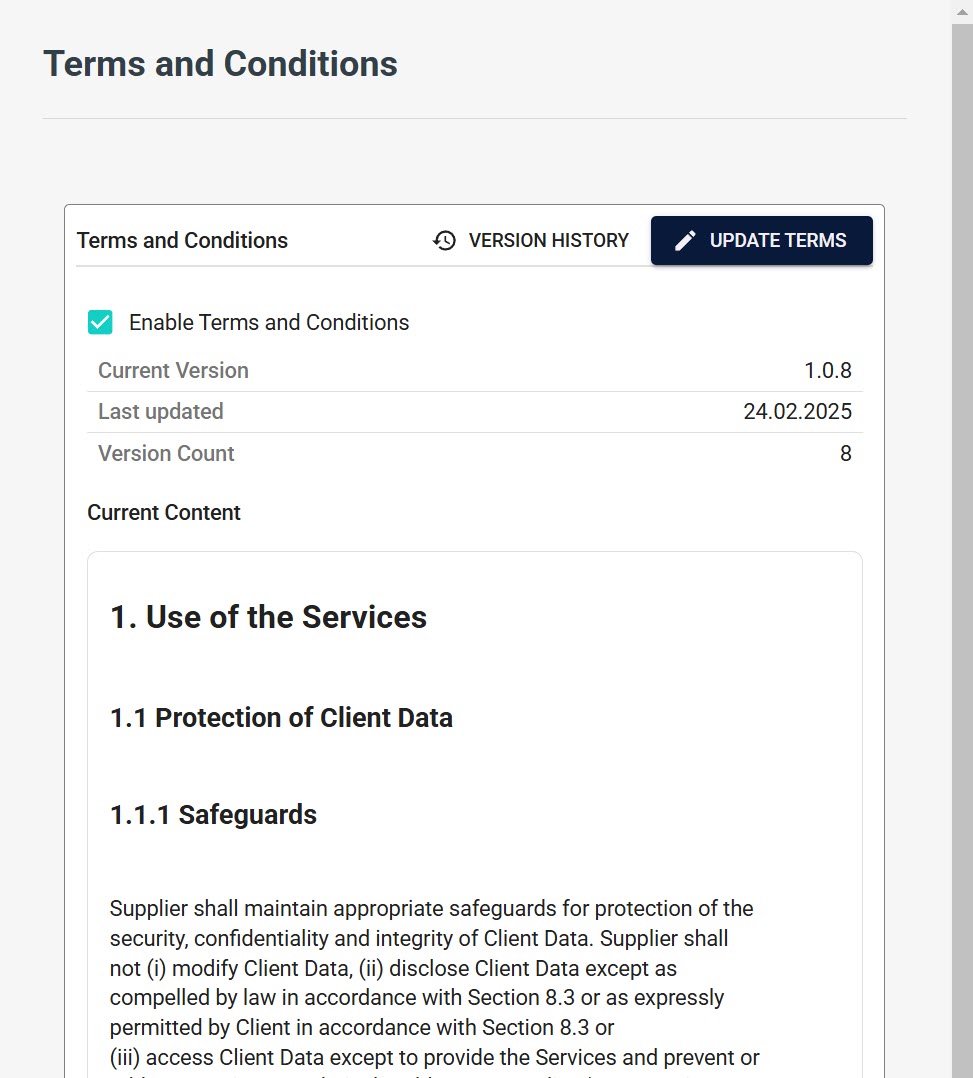
Dashboard Overview
The dashboard provides:
- Enable/disable toggle switch
- Current version display
- Last updated date
- Version count
- Content preview
- "VERSION HISTORY" and "UPDATE TERMS" buttons
Initial Setup Steps
- Navigate to the Domain Management page
- Find the "Terms and Conditions" section
- Click on MANAGE TERMS & CONDITIONS
- Toggle the switch to enable Terms and Conditions
- You'll be prompted to create your initial version
For detailed information about creating and managing content, see:
Troubleshooting Initial Setup
For content-related issues or version management, refer to the Content Management Guide.
Need Help?
- Review the Content Management Guide for detailed content creation instructions
- See User Acceptance Flow for understanding user experience
- Contact technical support for setup assistance