Sensitive Fields
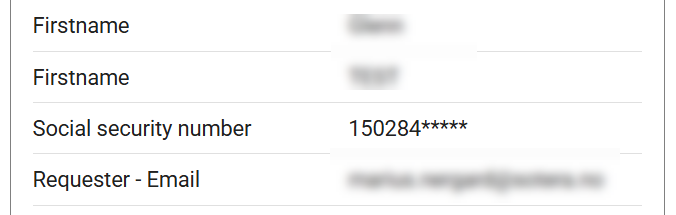
Sensitive fields protect the stored value of a text field in a Credential Template by encrypting it at rest. Instead of showing the raw value in a Credential record, Breeze shows a masked representation — such as 150288***** or ******. Only users with the Sensitive Data Viewer task role can read the original plaintext.
Sensitive fields are useful for personally identifiable data — such as social security or passport numbers — that should not be visible to everyone who can open a Credential.
To enable sensitive fields on a Card Template, see Configuring Sensitive Fields in Card Templates.
What users see
How a sensitive field appears depends on whether the user has the Sensitive Data Viewer role.
Without the role: The field shows a masked value and a lock icon with the tooltip "Sensitive (Encrypted)".
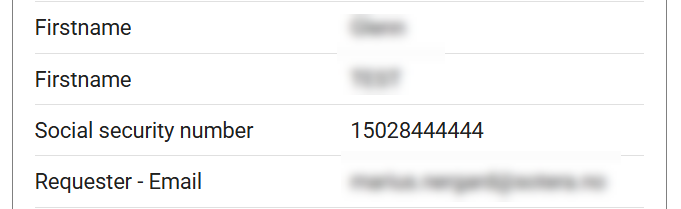
With the role: The field shows the decrypted plaintext value in the same position.
The mask pattern — and therefore which characters are visible — is set per field in the Card Template editor. It cannot be changed from the Credential detail view.
Mask pattern options
| Preset | Effect | Example (input: 150288123456) |
|---|---|---|
Full mask (***) | All characters replaced | ****** |
| Mask first 4 | First 4 characters masked | ****88123456 |
| Mask first 6 | First 6 characters masked | ******123456 |
| Mask last 4 | Last 4 characters masked | 15028812**** |
| Mask last 5 | Last 5 characters masked | 1502881***** |
| Custom | first:N masks the first N characters; last:M masks the last M characters | Configured in the template editor |
For setup instructions, see Configuring Sensitive Fields in Card Templates.
Sensitive Data Viewer role
The Sensitive Data Viewer task role grants read access to plaintext values across all sensitive fields on any Credential the user can open. Without this role, the masked value is the only representation a user sees — regardless of their other permissions.
The role is created automatically on deploy. Administrators assign it through the standard user role assignment flow. See Roles and Permissions for details.
If a Card Template uses a sensitive field in its card layout or encoding, every production operator who processes those cards must have the Sensitive Data Viewer role. Without it, the production job cannot decrypt the field value and will not complete.
Known limitations
- Existing data is not encrypted automatically. Marking a field as sensitive encrypts new and updated values going forward. Values already stored remain unencrypted until Sotera support runs a migration for the affected template.
- Text fields only. Sensitive field configuration is not available on date, image, or other non-text field types.
What's next?
- Configuring Sensitive Fields in Card Templates — enable the toggle, choose a mask pattern, assign the role
- Roles and Permissions — full role model and assignment guide