Connectivity and Security for AMR SQL
This guide defines the common security and connectivity requirements for AMR SQL integrations (SQL Synchronization and SQL Transfer).
Security requirements
- Transport encryption: Use TLS 1.2+ for all database connections. The SQL Server must present a certificate issued by a publicly trusted CA; private CAs and self‑signed certificates are not supported. The host name must match the certificate CN/SAN.
- Authentication: Only SQL logins are supported. Windows/AD or certificate‑based authentication methods are not supported.
- Least privilege: Use a dedicated SQL login with the minimum required permissions. Grant DDL permissions only if using schema management modes that create or alter tables.
- Secrets handling: Passwords are write‑only in the UI and are never included in emails or logs.
- Data at rest: For Breeze‑hosted SQL, platform encryption (for example, TDE on Azure SQL) protects data at rest. For customer‑hosted SQL, enable TDE or equivalent disk/database encryption per your policy.
Network connectivity options (Option A)
Preferred options for customer‑hosted SQL:
- Azure App Service Hybrid Connections (recommended): Outbound‑only TLS tunnel from your network to Azure Relay. No inbound firewall openings are required. See: Setting up Azure App Service Hybrid Connection to Your SQL Server.
- Site‑to‑site VPN or equivalent: Private network link from Azure to your environment without exposing SQL to the internet.
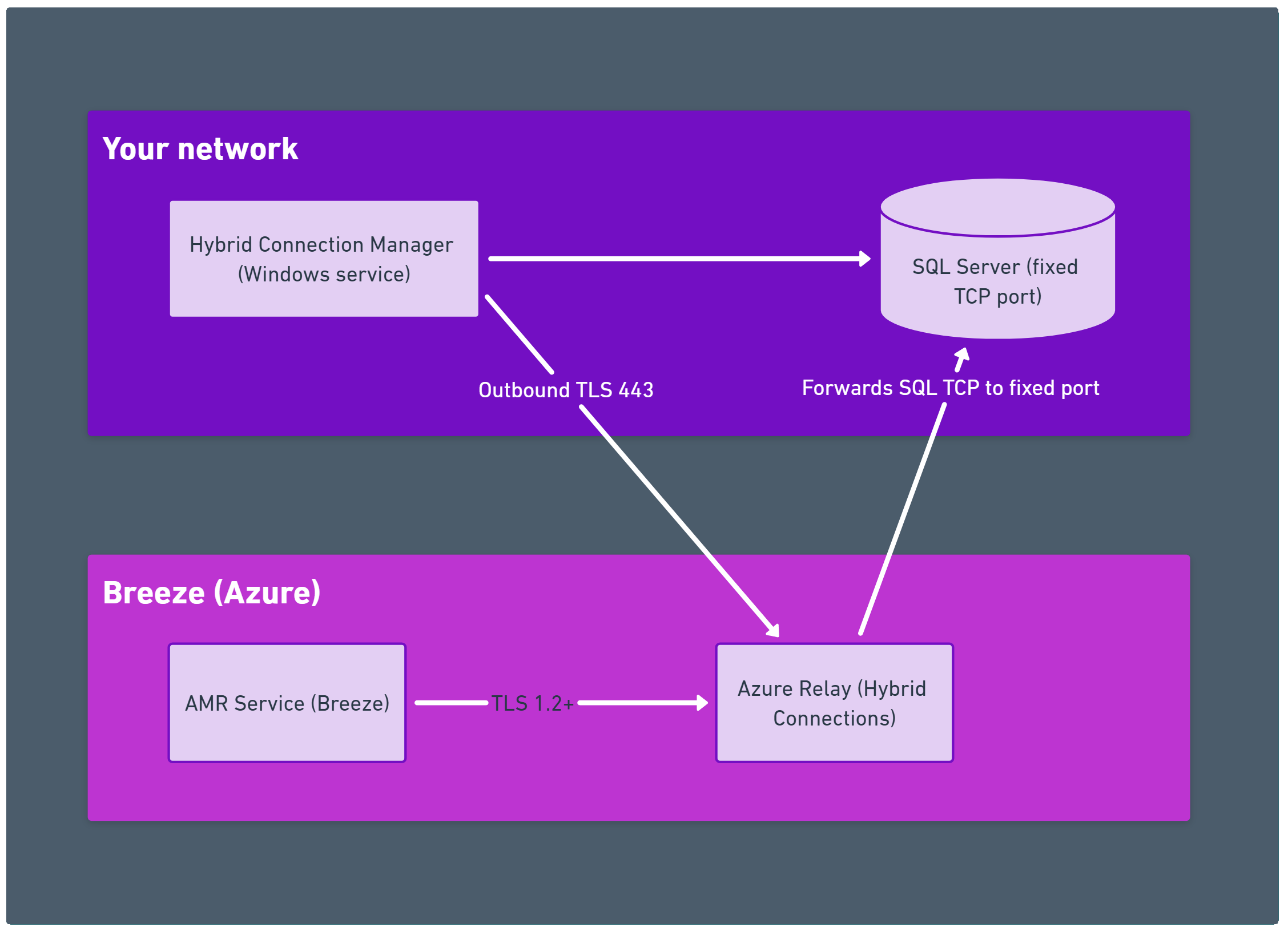
If private options are not possible (not recommended), you may allow public connectivity with strict controls:
- Open inbound TCP 1433 (or your fixed SQL port) only from Breeze egress IPs
- Prefer a fixed port/instance (named instances require additional ports). If using named instances with SQL Browser, also allow UDP 1434 and the instance's dynamic TCP port
- Enforce TLS 1.2+ with a publicly trusted CA certificate
- Allow DNS resolution for the SQL host FQDN
- Contact Breeze Support for current Breeze egress IPs to allowlist
- Do not expose SQL Server broadly to the internet; restrict to the minimal required IPs and ports
Breeze‑hosted SQL (Option B)
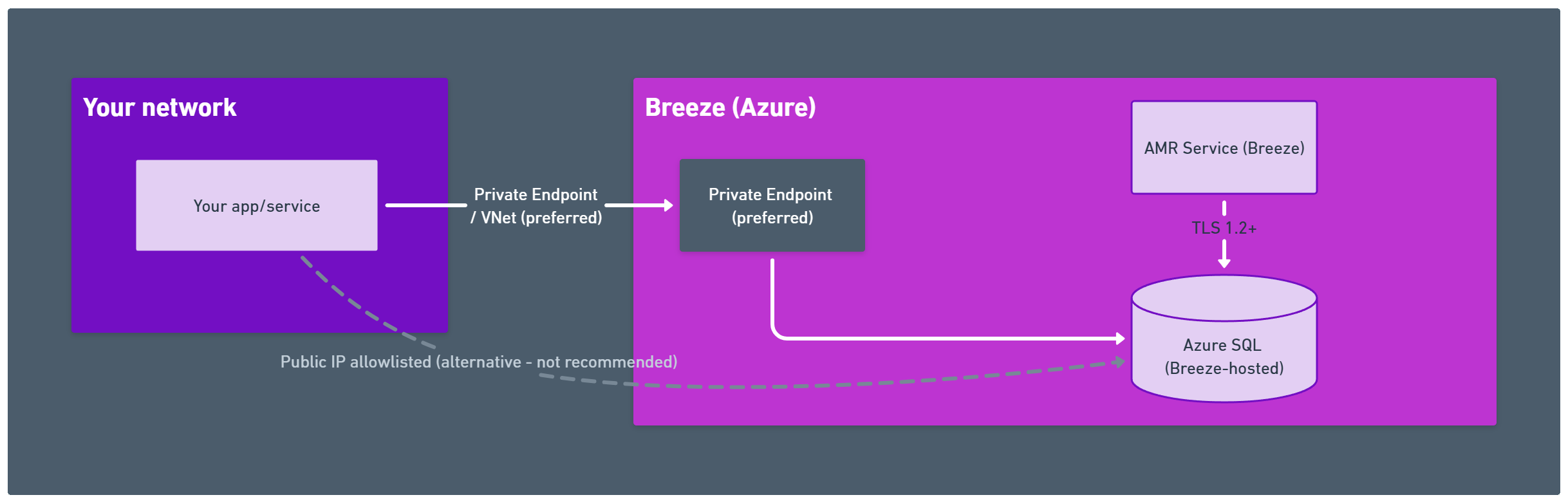
- Prefer Private Endpoint when the consumer of data runs in Azure; otherwise, we allowlist your public IP(s) on the SQL firewall
- TLS 1.2+ is required; certificates chain to publicly trusted roots
- Data at rest is protected with platform encryption (for example, TDE on Azure SQL)
- We provision per‑tenant SQL logins with least‑privilege access
- Your network needs outbound TCP 1433 to the provided SQL FQDN (or to the Private Endpoint via your private network)
Operational notes:
- Breeze provisions and maintains the SQL instance. Storage and performance sizing are agreed during onboarding and billed as an add‑on
- Access credentials are provided securely and can be rotated on request
Troubleshooting highlights
- TLS/certificate errors: Ensure the certificate chains to a publicly trusted root and the host name matches the certificate CN/SAN
- Connectivity: For Hybrid Connections, verify outbound TCP 443 and HCM status = Connected; for public connectivity, verify firewall allowlisting and fixed port
- Permissions: Confirm the SQL login has required rights and matches schema management mode