Tenant Duo ID Email Settings
A Tenant can customize its own subject and content for the Duo ID invitation, rejection, and reminder emails, layered on top of whatever its Domain has already configured. Use this when one Tenant under a Domain needs its own Duo ID wording — for example, a customer-facing Tenant that wants to mention its own help desk — without changing what every other Tenant under the same Domain sends.
Required roles: Super Administrator
These settings only appear for Super Administrators of the portal, and only when your Domain has the Duo ID feature enabled. Changing the Domain-level settings instead needs the System Administrator and Domain Administrator roles — see the Domain-level page.
Where to find it
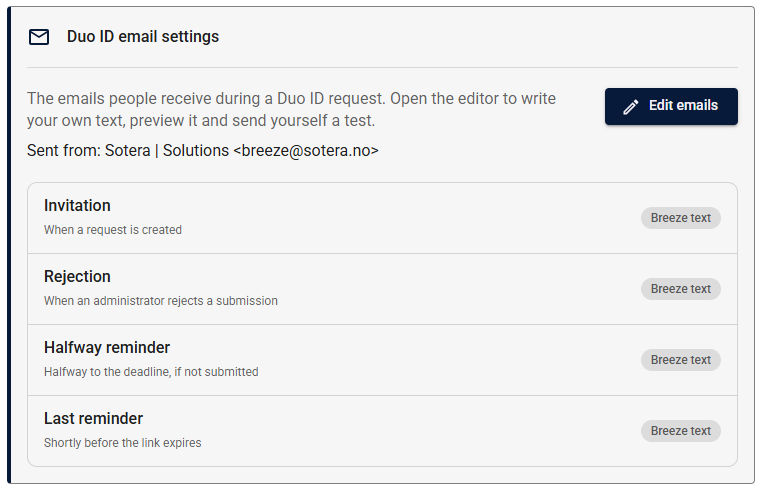
Navigate to the Tenant's settings page and open the Approvals settings tab. The Duo ID email settings section lists the four emails and which text each one uses. Click Edit emails to open the editor full screen.
How it works
The editor is the same screen as the Domain-level Duo ID Email Settings: the same list of four emails (Invitation, Rejection, Halfway reminder, Last reminder), the same templates, details, Duo ID button, formatting toolbar, live preview, and test-send button.
On the left of the editor, the sender is shown read-only, and each email shows which text it uses. An orange dot marks an email with changes you haven't saved yet.

The difference is where your settings sit in the resolution chain:
- Subject and content you set here take priority over your Domain's setting for the same email, which in turn takes priority over Breeze's text. An email you haven't written your own text for shows Domain's text in the list if your Domain has customized it, or Breeze text if nothing has been customized anywhere. The preview shows whichever text people actually get.
- When your Domain has its own text for an email, The Domain's text is offered as a starting point next to the templates, so you can adjust its wording instead of starting over.
- Sender can't be changed here. The tab shows the sender name and address your Duo ID emails are sent from, which a Domain Administrator sets. A sender address has to be on an email domain that is verified for sending, and only Domain Administrators can arrange that.
See How settings are resolved on the Domain-level page for the full chain, the Duo ID button requirement, the available details, and how test emails and saving work — all of it applies here unchanged.
Learn more
- Domain-level Duo ID email settings — the full reference, including the sender resolution chain and available variables.